CS-08 · DOCS TO DESIGN · FIGMA PLUGIN

Word to Figma. In 60 seconds. Down from 4 to 8 hours.

I built Docs to Design because MZM Labs's client deliverables were eating 4 to 8 hours of transcription work per project — and the same broken math hits every brand team, marketing ops, and agency turning Word documents into polished Figma, Canva, or InDesign deliverables. Figma plugin shipped first; the parser is portable in spirit, and public demand-signal waitlists for Canva and InDesign track whether the broader audience would actually use it.

~60 sec
Plugin run on a typical 8-page client deliverable
4 to 8 hr
Manual transcription replaced per polish deliverable
Solo
End-to-end build: plugin, parser, UI, brand
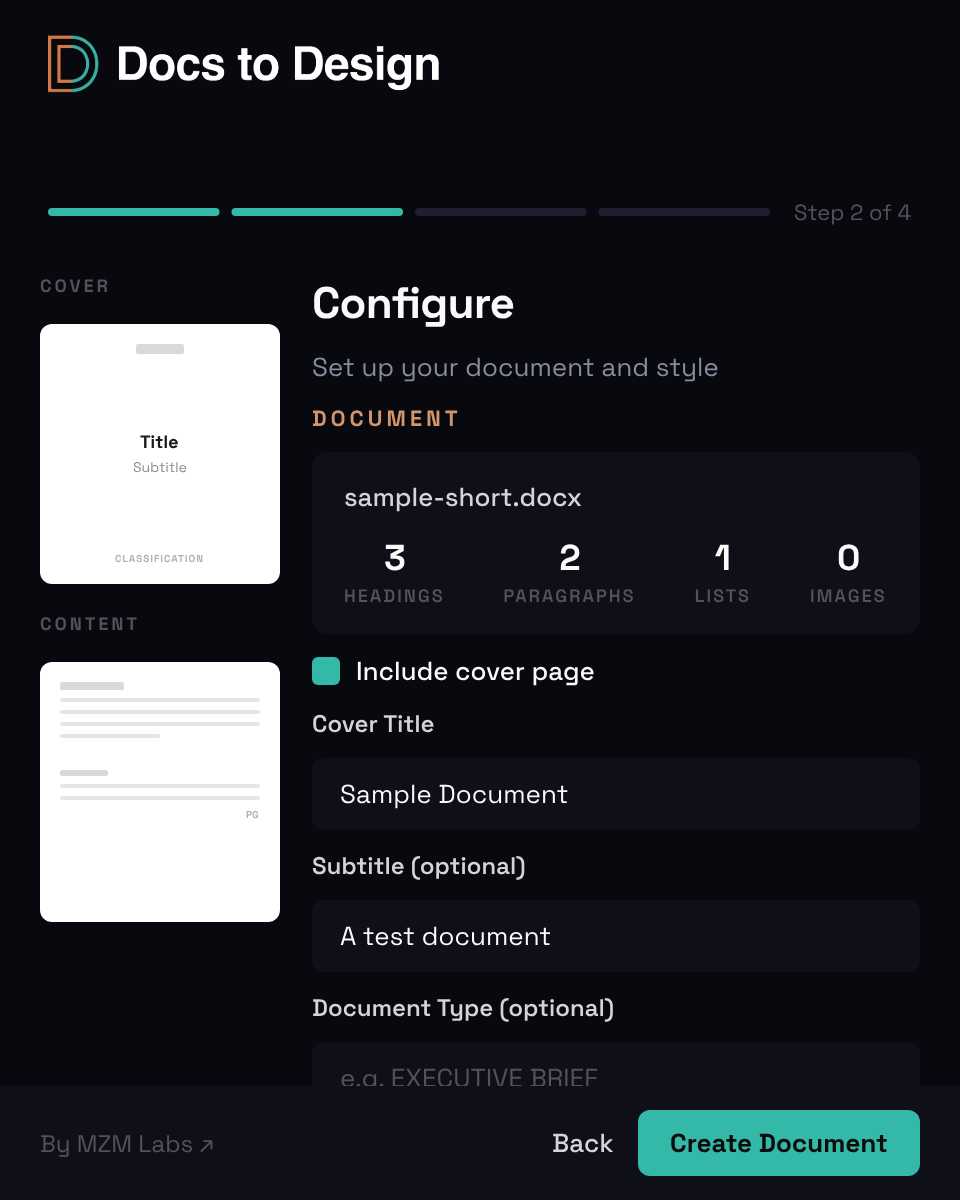
Docs to Design plugin — Step 02 Document Details modal: page list with 8 of 10 pages selected, document type, classification, and continue control. Dark plugin UI with cyan accent.
Role
Product Designer
+ Developer
Timeline
2025 – 2026
Type
Figma Plugin
(docstodesign.com)
Format
Test case for solo
product thinking
(pre-submission to
Figma Community)

Every MZM Labs client project came with stacks of documents — Word files I cleaned up, structured, and turned into polished deliverables with cover pages, logos, photos, callout notes. The transcription work — copy, paste, page break, auto-layout, type spec — ate the hours that should have been imagery and craft decisions clients actually paid for. So I built Docs to Design to take that part off the agency's plate. Plugin code, .docx parser, Figma node generation, UI bridge, brand identity, marketing site — all me.

Built as a test case for shipping a real product solo, end-to-end — alongside MZM Labs client work, not as a separate business pursuit. The design proof is the point.

( 01 )Problem

Clients paid for the polish, not the transcription. So the math broke.

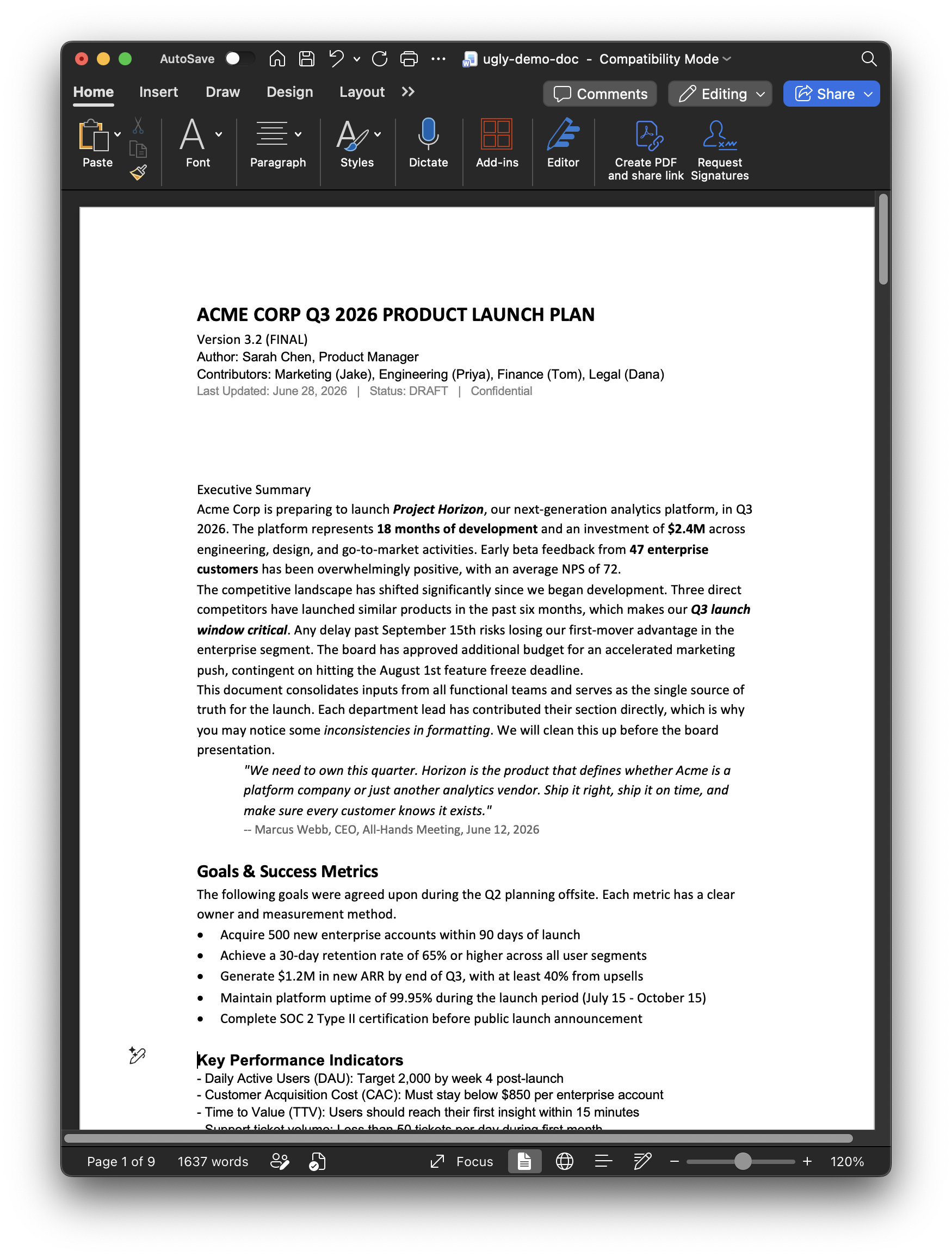
Every client project followed the same rhythm. Client sends a Word document — meeting notes, a strategy memo, an investor update, a research brief. My job was to turn it into a polished deliverable: cover page, logo, brand-consistent typography, headers and footers, page numbers, callout notes, photos that reinforced the message. Half the work was the polish. The other half was just getting the content into Figma in the right shape — copying paragraph by paragraph, recreating the heading hierarchy by hand, building auto-layout frames, applying type styles, paginating into US Letter pages, adding cover and footer chrome.

An 8 to 10 page document took 4 to 8 hours of transcription work before I could touch the parts that actually justified the rate — imagery, photo selection, callout placement, the design decisions clients pay for. And it wasn't just my problem. The same 4-to-8-hour transcription tax shows up for every brand team, marketing ops crew, and agency that ends a meeting with "we'll polish that up in Figma" — or in Canva, or in InDesign. Different tools, same broken math.

Microsoft Word document open at 120% — 'ACME CORP Q3 2026 PRODUCT LAUNCH PLAN' Version 3.2 (FINAL). Author Sarah Chen, Product Manager. Contributors across Marketing (Jake), Engineering (Priya), Finance (Tom), Legal (Dana). Body shows Executive Summary, Goals & Success Metrics with bullets, Key Performance Indicators. Page 1 of 9, 1637 words. The kind of structured client document that turns into 4–8 hours of Figma transcription work.
( 02 )The workflow shift

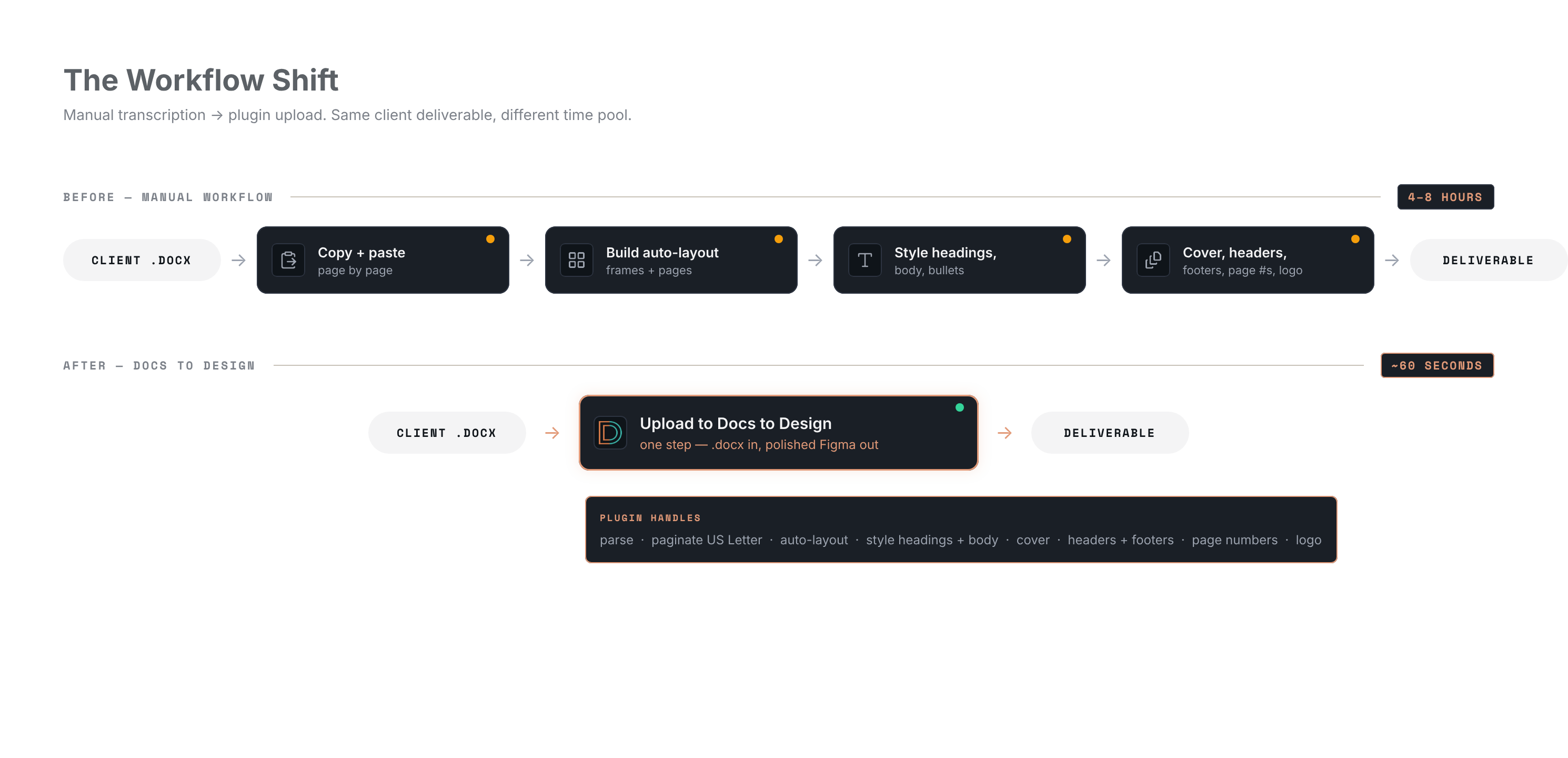
Four manual stops collapse into one upload.

Same client deliverable, different time pool. The plugin doesn't speed up transcription — it absorbs it.

( 03 )Approach

Build the engine once. Distribute across the surfaces designers already work in.

The decisions that mattered weren't about features — they were about where the time saved would land, and which design surface to validate the engine on first. Build the .docx parser once. Pick the design tool with the most direct path to real users for v1. Use that signal to read whether the broader audience — across Canva and InDesign — would actually want it before building either. If the plugin saved 4 hours but I spent those 4 hours configuring the plugin — or shipping three brittle plugins on launch day — I'd built the wrong thing. So the defaults had to be opinionated, the wizard short, the polish chrome (cover, headers, footers, logo) generated automatically. And the engine had to be portable.

How might I

Move the document-transcription phase off the clock for every brand team, marketing ops, and agency that ends a meeting with "we'll polish that up in Figma" — Figma first, Canva and InDesign next — so the hours saved land in the imagery, photo selection, and craft that justifies the deliverable.

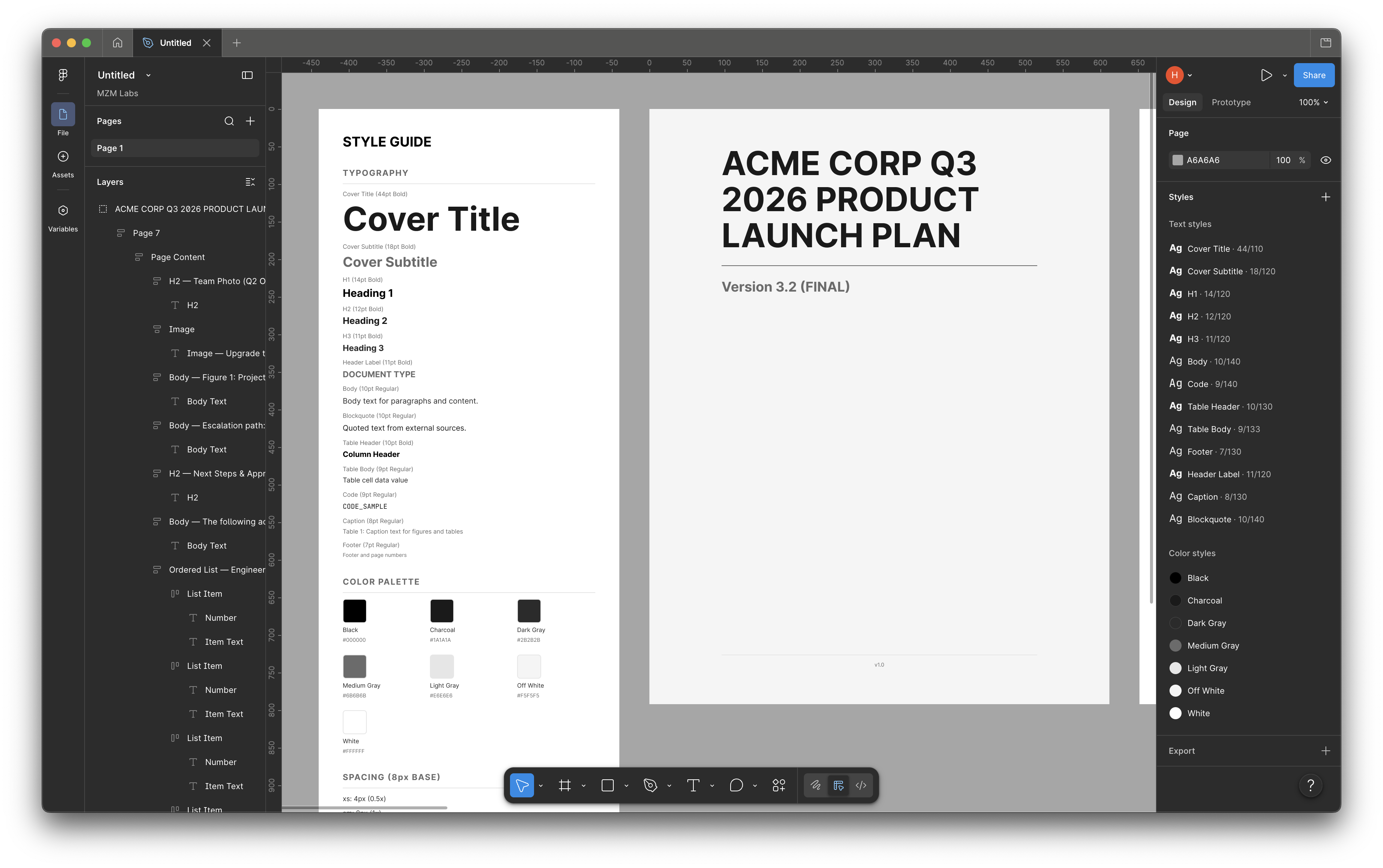
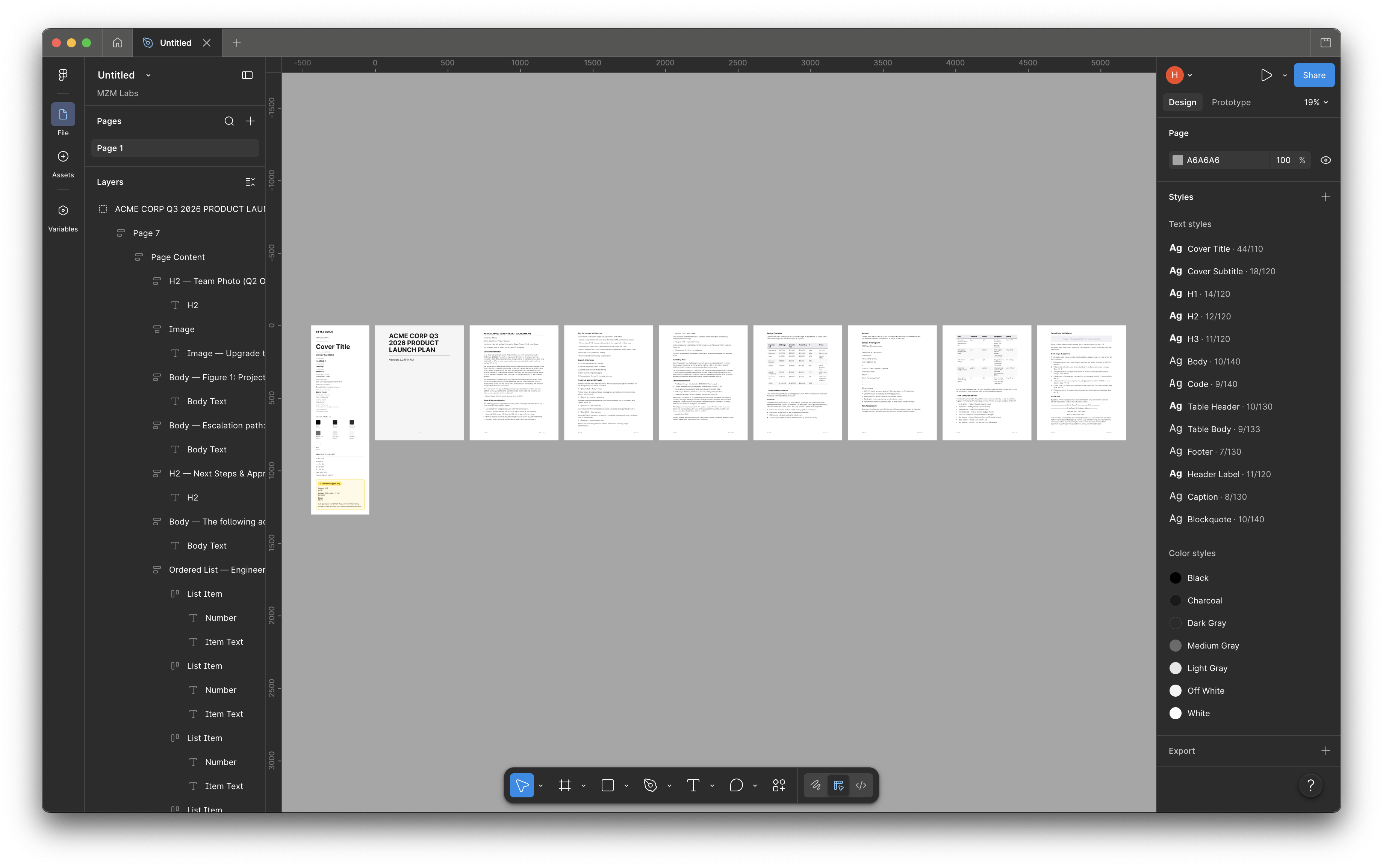
Figma canvas after Docs to Design plugin run — Style Guide companion page on the left showing the full type spec (Cover Title, Cover Subtitle, Heading 1, Heading 2, Heading 3, Body) and the brand Color Palette swatches; Cover page on the right with 'ACME CORP Q3 2026 PRODUCT LAUNCH PLAN — Version 3.2 (FINAL)'. Layers panel left shows named structure: ACME CORP Q3 2026 PRODUCT LAUNCH PLAN > Page 7 > Page Content > H2 — Team Photo > Body — Figure 1 Project > Body Text > Ordered List — Engineer. Text Styles + Color Styles panels right show the design system the plugin links into the canvas. Evidence that the polish chrome — type spec, color palette, layer naming — generates as part of the engine, not as designer follow-up.
( 04 )The build

Three trade-offs that shaped what got cut, what got automated, and what got priced.

Decision 01

.docx in. One parser, three target surfaces.

Was tempted
Three plugins on day one — Figma, Canva, and InDesign in parallel — to maximize launch surface.
Chose
Build the .docx parser engine once. Ship the Figma plugin first. Public demand-signal waitlists for Canva and InDesign collect interest data without committing to ship either.
Because
Figma's plugin marketplace is the most direct path to real users on a real design surface — engine validation in months once submitted, not a year of speculation. Until the Figma submission lands, MZM Labs client deliverables are the validation surface — every doc Pheak runs through the plugin is a real-world test on real client work. The waitlist data on Canva and InDesign tells me whether the broader audience would even use those ports before I'd build either one. Three brittle plugins on day one would have been worse than one product with mechanical demand-signal.
Decision 02

Polish chrome auto-generated. Wizard asks only what the designer knows.

Was tempted
Maximum configuration surface — every setting exposed, every micro-decision in the wizard.
Chose
Cover page, headers, footers, page numbers, US Letter dimensions, hierarchical type spec — auto. Wizard asks for heading font (with fallback chain), 1-col vs 2-col layout, brand color, logo upload, classification text. Sensible defaults for everything else (margins, bullet style, table lines, footer format).
Because
The whole pitch was "save my time." A configuration surface IS time. Defaults match how a polish deliverable already looks.
Decision 03

Free tier sized to my own pain. Monetization architecturally modeled, not yet pursued.

Was tempted
Skip the tier work entirely (free forever) or model an elaborate pricing matrix on day one.
Chose
Two-tier model — Free (8 pages per doc, 5 imports per 30 days) + Pro (unlimited). Pricing logic coded but kept gated until launch.
Because
Shipping a real designer-tooling product means engaging with the monetization design, not avoiding it. The 8-page free tier exists because that's exactly the unit eating MZM Labs's time on agency client deliverables — sized so other designers feel the win on a real document, not on a demo. Specific pricing held until launch — the design proof is the point.
( 05 )Plugin flow

Four steps. Sub-minute. End-to-end.

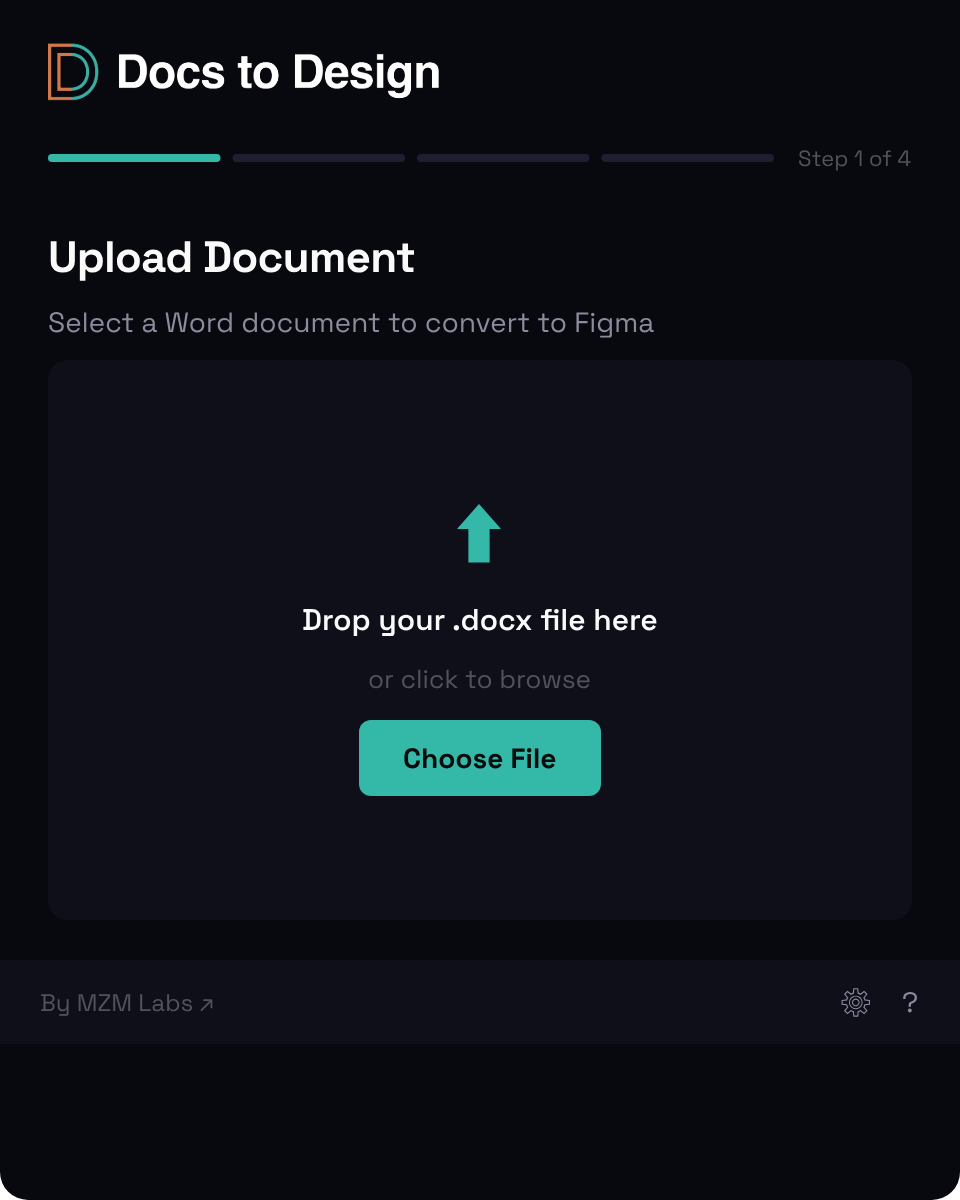
Step 01 · Upload

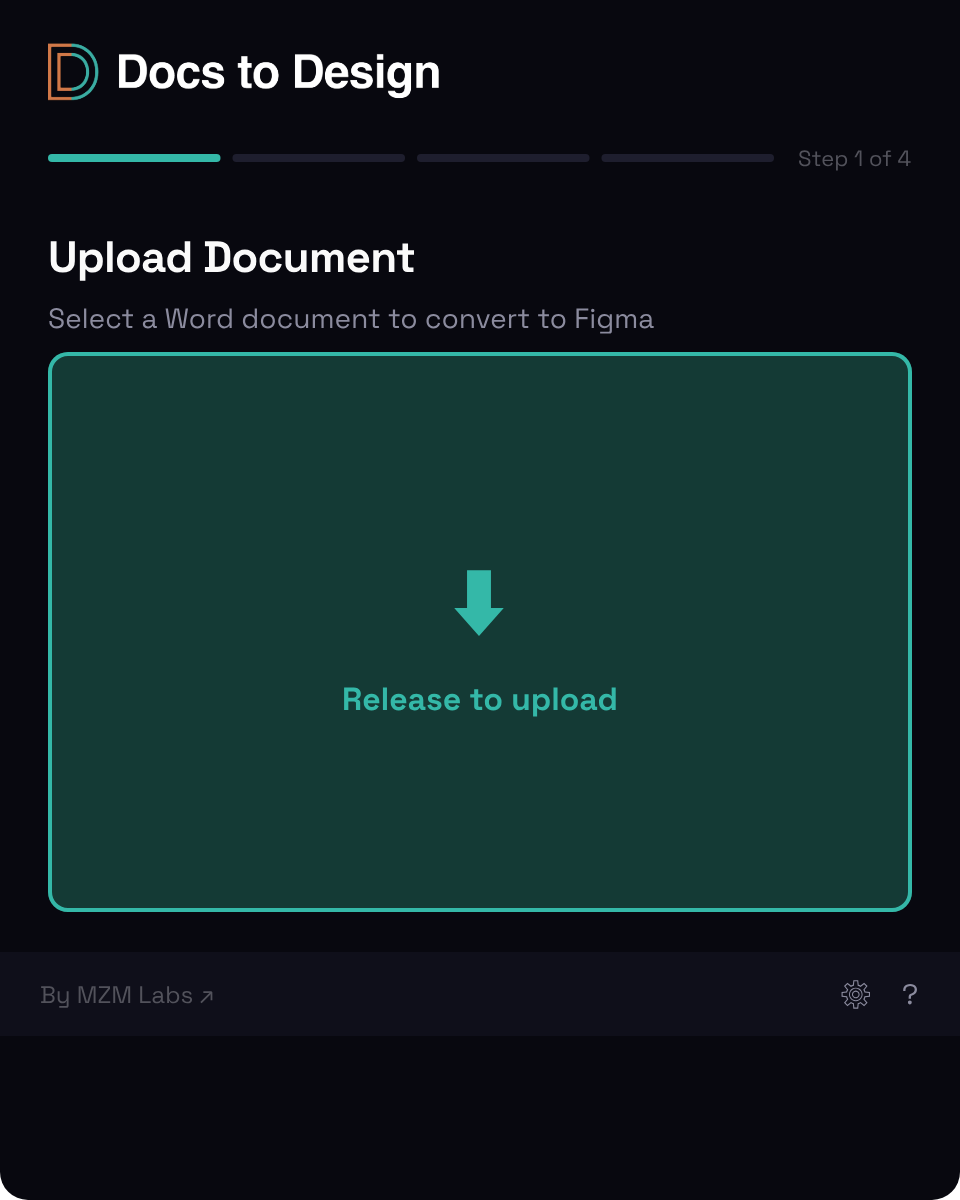
Drag the .docx in.

Plugin opens inside Figma at 480×600 px. Empty drop zone on first launch — the only valid input is .docx, so the UI doesn't pretend otherwise. Drop the Word file, the parser runs, page count + file size resolved within a second. No file dialog, no format prompts.

Plugin upload screen — empty state with cyan dashed drop-zone, 'Drag your .docx file here' instruction, and Choose File secondary action. Plugin upload screen — file dropped state with the Word document mid-drop, drop-zone activated cyan, and progress on the way to parse.
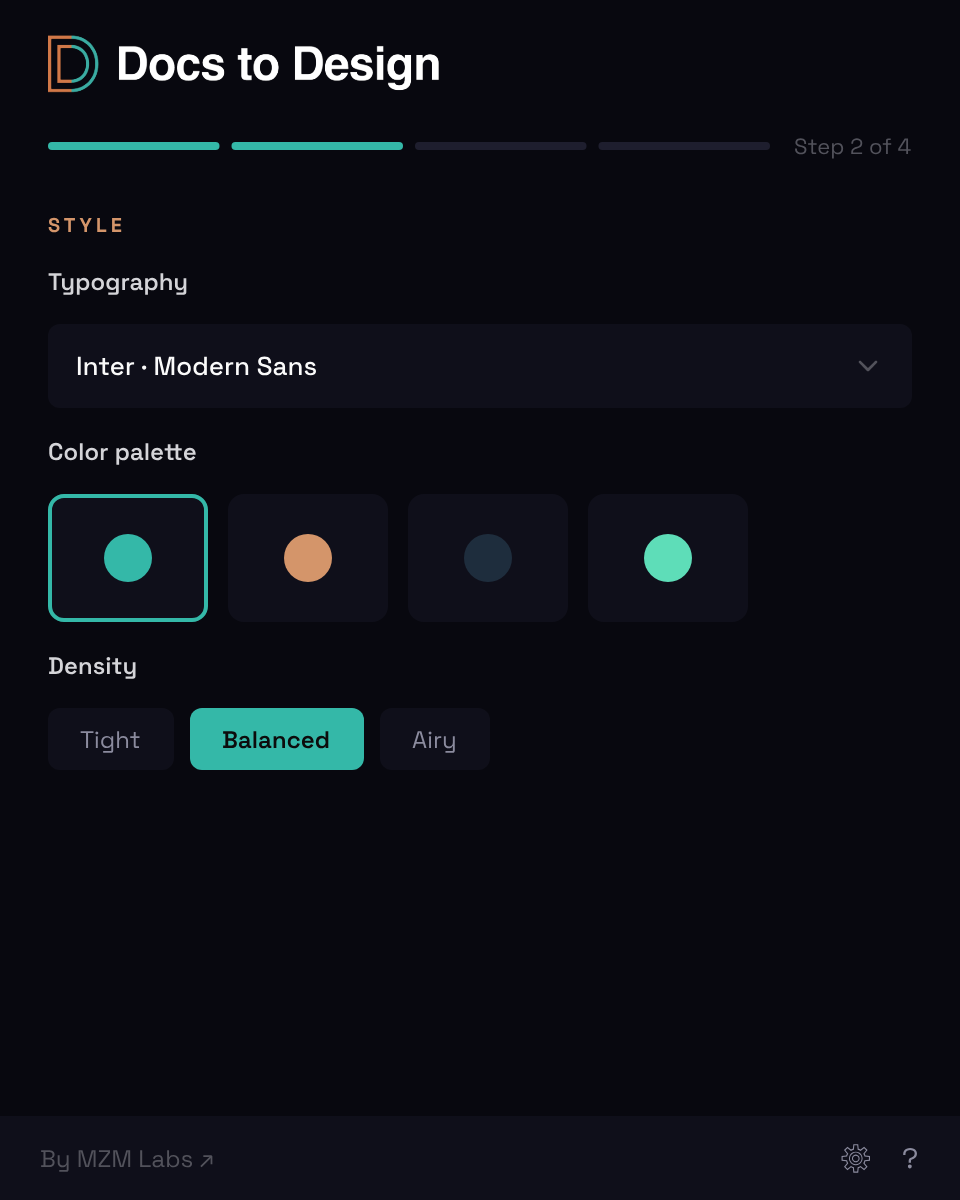
Plugin Document Details screen — page list with 8 of 10 pages selected, doc-type field, classification text, and continue control. Plugin Style screen — searchable font picker for heading font, brand color swatch row, layout toggles for portrait/landscape and 1-col/2-col, and logo upload affordance.
Step 02 · Configure

Pick what only the designer knows. Skip the rest.

Document Details: page count detected, doc type, classification, optional cover-page fields. Style: heading font (searchable picker over Figma's full font list, with Bold→SemiBold→Regular fallback), 1-col or 2-col layout, portrait or landscape, brand color, logo upload. Margins, bullet style, table line treatment — sensible defaults. Skip-able if the brand stack is already remembered.

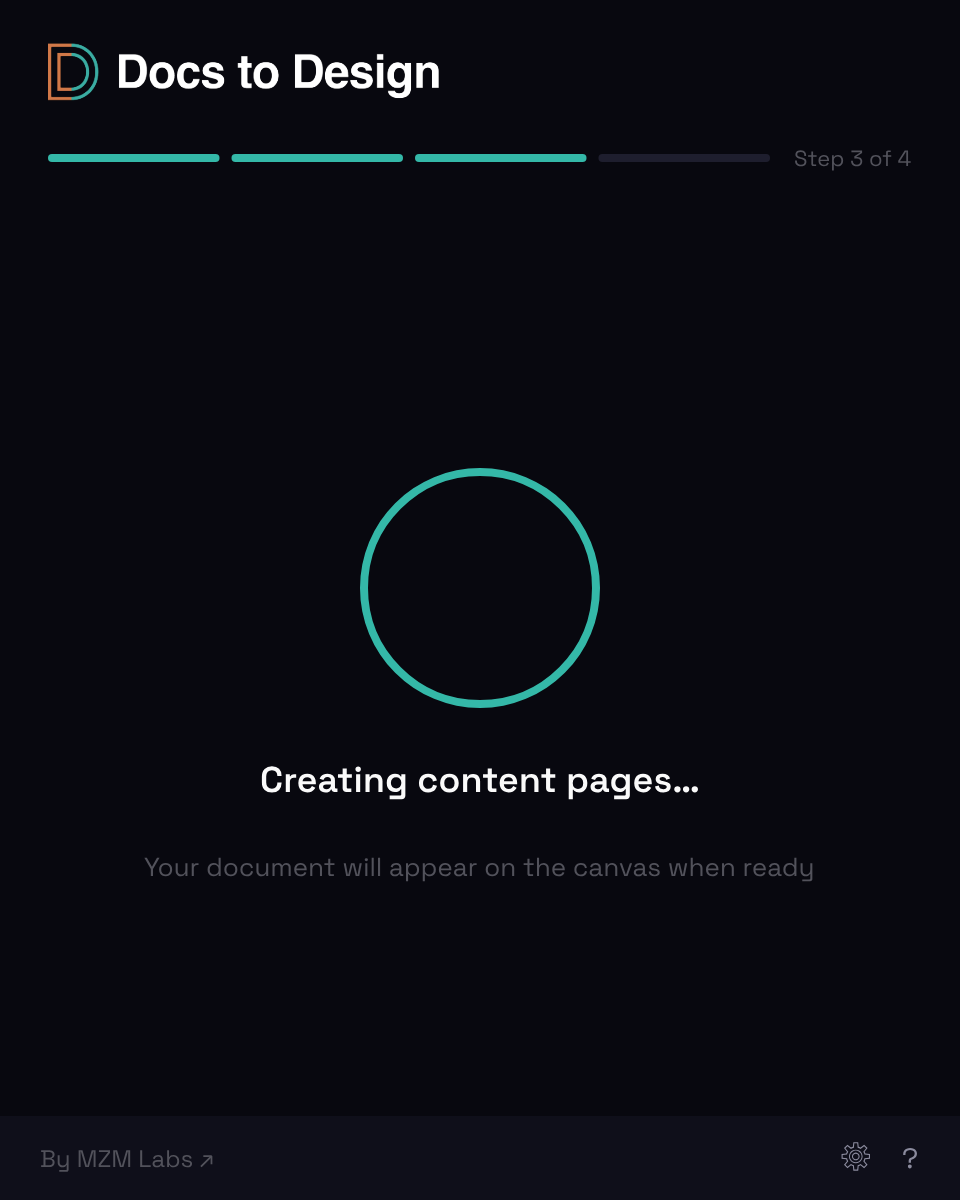
Step 03 · Creating

Watch the pages land. Then a clean exit.

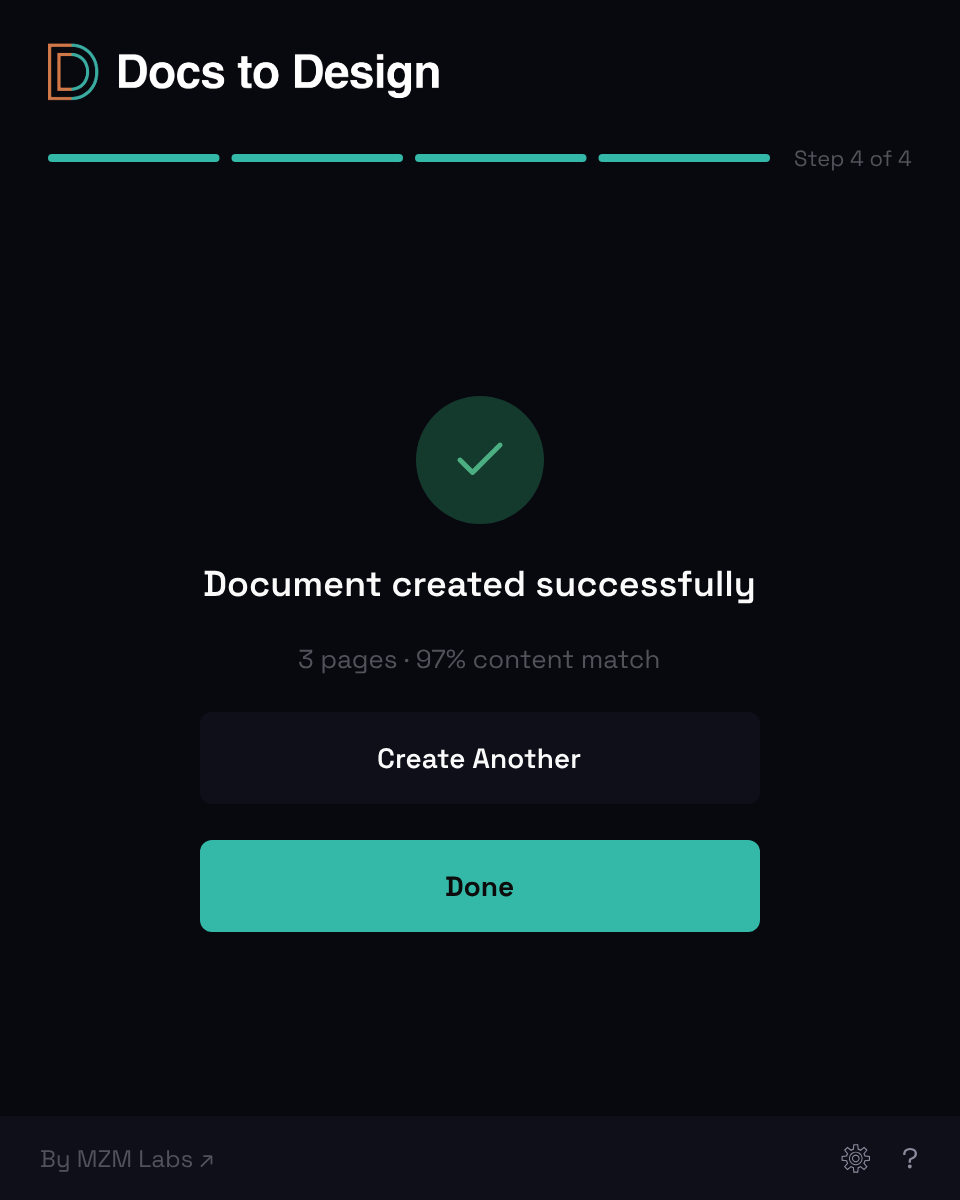
Plugin generates each page in sequence — cover, body pages with hierarchical typography, lists and tables preserved, headers and footers with page numbers and document type, US Letter dimensions throughout. Progress arc shows percent complete. About 30–60 seconds for 8 pages. Then a clear "Document created successfully" state with a QA card showing source-vs-output word match.

Plugin progress screen — cyan progress arc mid-fill, 'Creating content pages…' status, and animated page thumbnails appearing as each generated page completes. Plugin complete screen — green checkmark, 'Document created successfully' message, and View Document primary action ready to focus the new Figma frames.
Figma canvas after Docs to Design plugin run — 7-page generated deliverable for 'ACME CORP Q3 2026 PRODUCT LAUNCH PLAN'. Cover page on the left, six body pages right. Layers panel shows named structure: Page Content, H2 headings, Body paragraphs, Image frames, Body Text, Ordered Lists. Text Styles panel shows the full hierarchy applied: Cover Title 44/110, Cover Subtitle 18/120, H1, H2, H3, Body 10/140, Code, Table Header, Table Body, Footer, Header Label, Caption, Blockquote. Color Styles panel shows the brand-color palette: Black, Charcoal, Dark Gray, Medium Gray, Light Gray, Off White, White.
Step 04 · Done

Designer-time begins here.

Pages land in the Figma canvas as editable frames — every layer named (Page Content, H2 — Team Photo, Body — Figure 1 Project, Ordered List — Engineer), every text style applied (13-step type scale from Cover Title down to Caption), every page sized to US Letter, the brand color palette already linked. The polish chrome is in. Now I can do the actual creative work — swap in real photos, place callout notes, refine imagery, push the visual language. The transcription part is over before it started.

( 06 )Results

Transcription time collapsed. Creative time expanded.

~60 sec
Plugin run on a typical 8-page deliverable
4 to 8 hr
Manual transcription absorbed per deliverable
8 pages
Free tier, sized to a typical client deliverable
4 steps
Upload → Configure → Creating → Done

The bigger result wasn't the time saved — it was where the time landed. Hours that used to disappear into copy-paste-format work now go into imagery, photo selection, callout placement, the decisions clients actually pay for. Same deliverable, same turnaround, same scope. Different work happening in the time it takes.

Live at docstodesign.com. Pre-submission to the Figma Community.

Designer time on creative craft
20%
Before
+75%
More time on craft, less on transcription
95%
After
Imagery Photo selection Callout craft
( 07 )Reflection

What worked

Picking Figma first was the right call. The plugin marketplace meant the engine got real-world validation on real client deliverables within weeks — me, on MZM Labs work — and demand-signal waitlists for Canva and InDesign quantified the broader audience before I'd built either port. The .docx parser is portable in spirit; the same engine could be ported to Canva or InDesign once the demand-signal threshold trips. And building it as a designer-developer-and-agency-operator hybrid — every product decision lived in the same head as every implementation decision and every billable client deadline — meant trade-offs got resolved by the constraints, not by handoff debates.

What to do differently

Should have built the parser as a portable engine from day one, with platform-specific renderers as thin layers. The .docx parser is currently too coupled to Figma's node API, so the Canva and InDesign ports require parser-refactor work I could have avoided with cleaner separation up front. Also: Google Docs and Markdown support belong in a near-term phase — they're the most-requested input formats from the demand-signal waitlists, and forcing users to convert to .docx first is friction the product was built to remove.

Two takeaways. Build the boring part you already do every week — that's where the leverage is. And size the free tier to the user's actual pain unit, not to a demo.

Up next · 01 / 04

Compliance UX

KYC that ships in 12 minutes — from 45. Investor onboarding redesigned for IIROC, Reg CF, MiFID, and FINTRAC across $2B+ in regulated transactions.

Read case study